

Steps to Use:
- Prepare JSON code – Write a JSON string describing the embed.
- Insert placeholders – Use dynamic placeholders like
{mention},{user},{guild},{avatar}to customize content for the user or server. - Send command – Type
/createembed {JSON}in your server channel. - Bot response – Omex will send the fully customized embed in the channel.
Placeholders & Customization
| Placeholder | Description |
|---|---|
{mention} | Mentions the user who triggered the command. |
{user} | Displays the user’s username in the embed author section or text. |
{id} | Shows the user’s Discord ID. |
{guild} | Displays the server’s name. |
{avatar} | Inserts the user’s avatar URL dynamically. |
Embed Components
- title → The main title of the embed.
- description → The body text of the embed.
- color → The sidebar color of the embed in hex format (
0x2F3136). - footer → Text at the bottom of the embed, with optional icon.
- author → Author section, which can include a name, icon, and URL.
- image → Display an image inside the embed.
- thumbnail → Small image on the side of the embed.
- fields → Add multiple fields, each with a name, value, and inline option.
⚠️ Note: Your JSON must be valid; otherwise, the bot will return a helpful error message with a link to the Omex Embed Docs.
Example Command
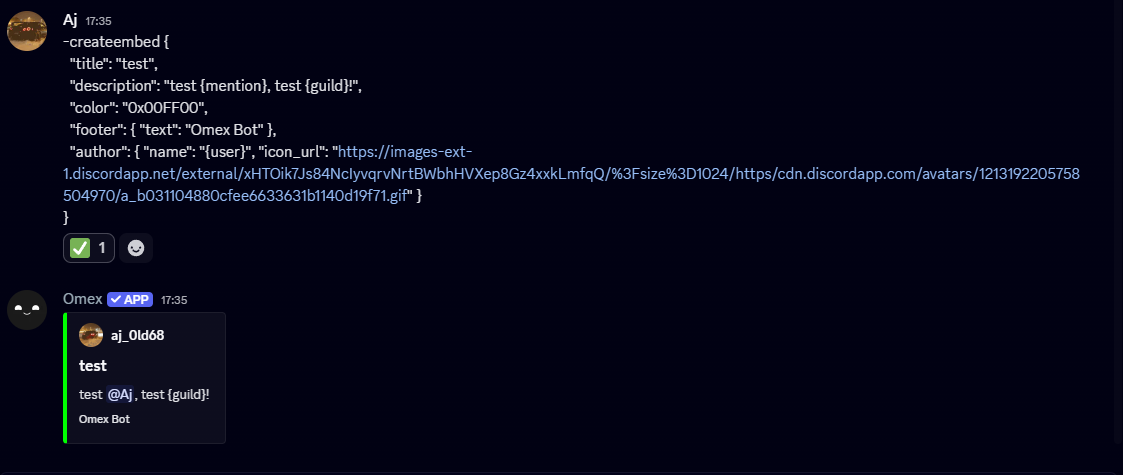
Here’s a practical example that dynamically uses the placeholders:- title:
"Welcome to the server!"→ The main heading of the embed. - description:
"Hello {mention}, we're glad to have you in {guild}!"→ Dynamic greeting using placeholders. - color:
"0x00FF00"→ Bright green embed sidebar. - footer:
"Omex Bot"→ Shows “Omex Bot” at the bottom of the embed. - author: Uses
{user}as the author’s name and{avatar}as their icon. - thumbnail: Also uses the user’s avatar for a visual effect.
Commands That Use the Embed Creator
/createembed– Main command to create any custom embed./greetingmessage– Sends a welcome message embed using placeholders for new members./announcementembed– Send announcements with dynamic server or user info./roleembed– Display roles or permissions in a custom embed format.
💡 All commands that use the Embed Creator require Omex Plus (Premium) and support the placeholders{mention},{user},{id},{guild}, and{avatar}.
Notes & Tips
- JSON Validation: Always ensure your JSON is properly formatted. Missing commas, braces, or quotes will cause errors.
- Preview Embeds: Consider using a JSON embed validator or a Discord embed previewer before sending.
- Error Handling: If your JSON is too long or invalid, the bot will provide a helpful error message, including what went wrong.
- Dynamic Content: Placeholders allow you to personalize messages for each user, making your server feel more interactive.